5 min readĐọc bằng tiếng Việt
Reviewing a test design with Tokay
What test case review looks like in VibeQA: hand edits, @Tokay comments that come back as suggestions, "Looks right" per case, and the checks before approval.
Tokay has drafted a test design for the Storefront checkout: a few requirements, a phone-number field split into valid and invalid values, and a list of cases. Nothing runs yet. Before any of it goes live, someone on your team has to read it, fix what is wrong and confirm each case. This post walks through that test case review, and the checks VibeQA makes before anyone can approve.
The draft is where test case review happens
A suite has at most one open draft. The live version stays as it is while you work; editing a live suite opens a new draft instead of changing what runs today.
You work through the draft in the review desk. Cases are grouped by scenario on the left, the open case reads as Given, When, Then in the middle, and its discussion sits on the right. A strip across the top shows how many cases look right so far.
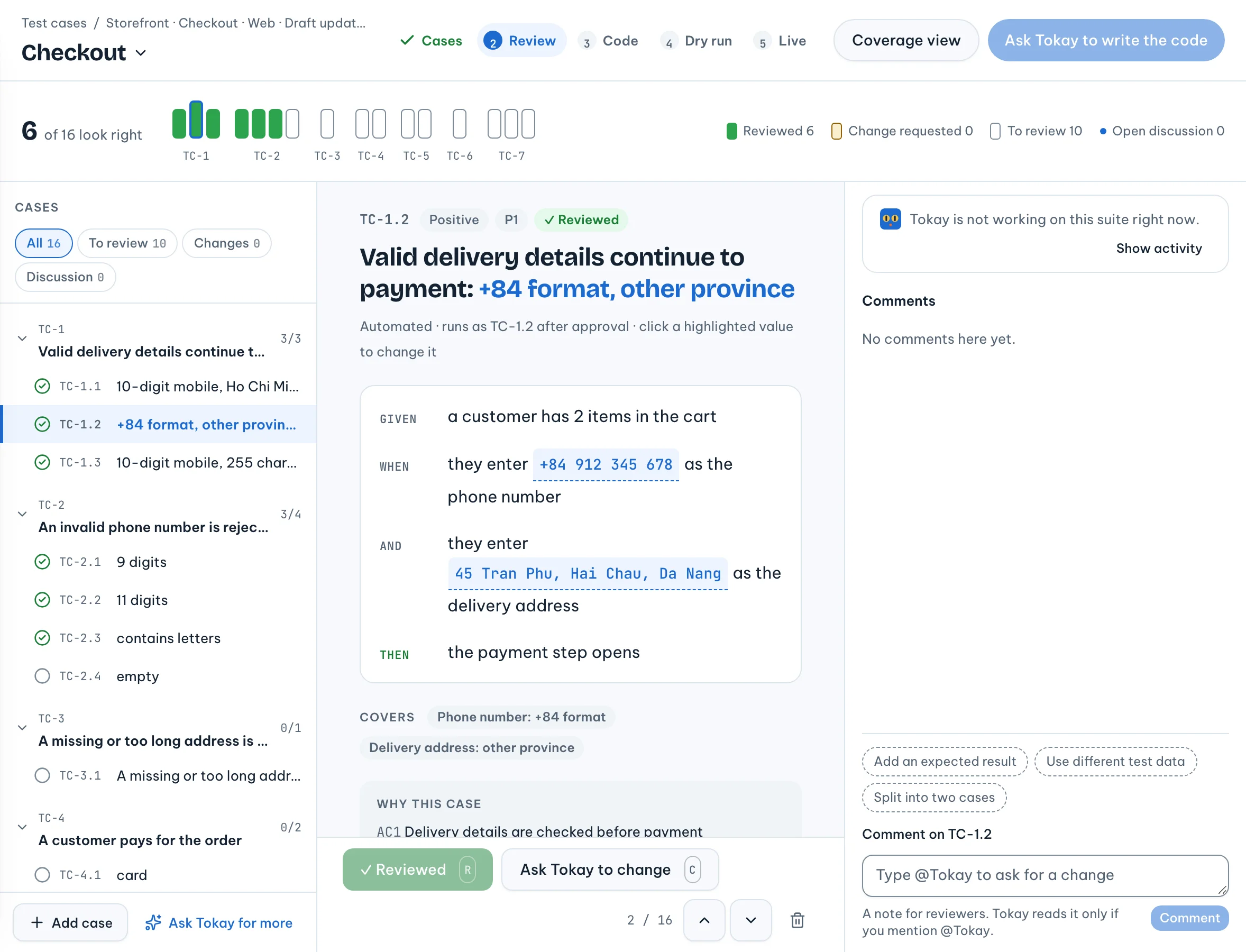
Reviewing is not only for people who write tests. A viewer, say a product manager, can comment on cases and confirm them without being able to edit the design.
There are three ways a case changes.
Edit it yourself
Click a highlighted value in the test data to change it, add a case to a scenario, or remove one. Your own edits apply at once. Each one is a small patch against a numbered revision of the draft, so if two reviewers change the same value at the same moment, the second is told that someone else changed the draft instead of silently overwriting it.
Ask Tokay in a comment
Write a comment on the case and mention Tokay:
@Tokay this should also try a number with spaces, like 090 123 4567.
Tokay does not edit the draft. It answers in the thread with a suggestion: the exact change, and what coverage looks like after it. You accept it, reject it, or edit it before accepting.
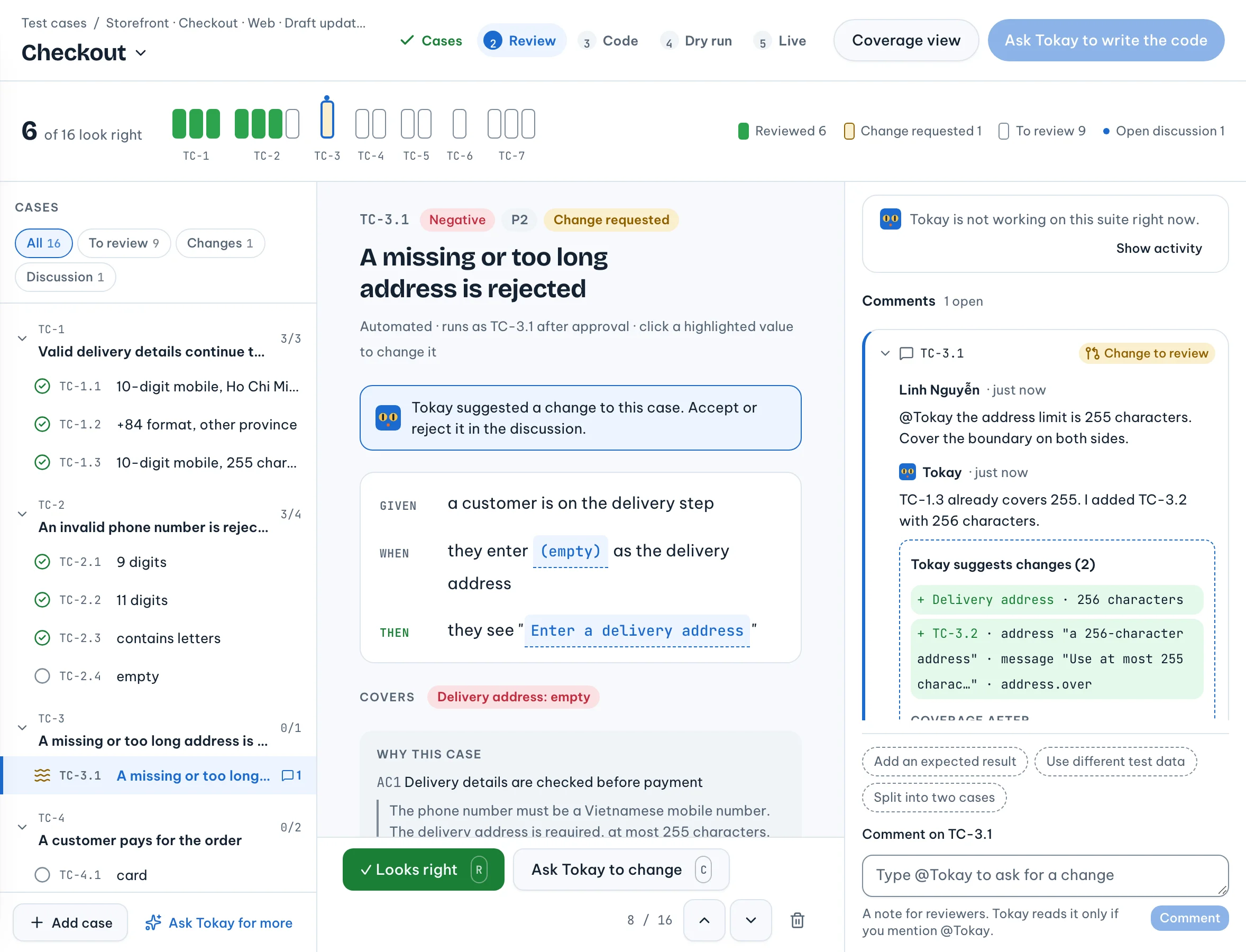
Accepting applies the change and resolves the thread. Rejecting leaves the thread open until someone resolves it. If the draft moved on and the suggestion no longer applies, it is marked stale; "Ask Tokay to redo" asks for a new one against the current draft.
A comment without @Tokay is a note for the other reviewers. Tokay reads it only when you mention it.
Answer Tokay's questions
Tokay asks too. If ticket SHOP-388 says "a valid phone number" and nothing more, Tokay is told to ask whether numbers starting with +84 count, not to guess. A question stays open until someone marks it settled and writes down what was decided.
"Looks right", one case at a time
Agreeing with a case is something a person does, not something VibeQA assumes. Each case has a "Looks right" button.
VibeQA stores that mark against a hash of the case as it reads now: the row's test data and the values it covers, plus its scenario's title, steps, priority and whether it is automated. Change any of those and the case goes back to To review. Edit one step of the "Pay with a phone number" scenario and every case in that scenario asks for a fresh look, because each of them now does something different.
It is strict on purpose: a "Reviewed" mark only means something if a person read the case that will run.
The coverage view
The coverage view lists, for each requirement, the values that must be tested, whether the app should accept or reject each one, and which cases use it. A value no case uses yet is marked "Not tested yet". A case that tries two wrong values at once is flagged: if the app shows only one error, that case proves neither. For a high-risk requirement, it also lists accepted values that no case uses together.
From there you can add a case, ask Tokay to cover a gap, or mark a value "Not needed here" with a reason that later reviewers read instead of a test. Coverage itself comes from a fixed rule, which the previous post explains; nobody declares it complete.
From review to code
Once every case is reviewed, the coverage has no gaps and nothing is left open, you ask Tokay to write
the code. It writes one Playwright test per automated case, named after the case, like TC-2.4.
"Run it once" then freezes the draft and its code into a new version and runs it in a sandbox, and
each test result is mapped back to its case.
Edit the design after the code is written and the code is out of date: the dry run and approval wait until Tokay writes it again.
What must be true before approval
When you press approve, VibeQA checks the version and refuses, with the reasons, unless all of these hold:
| Check | Why it matters |
|---|---|
| The code was generated from this exact design | The tests that run are the ones you reviewed |
| Coverage is complete | Every value that needs a case has one, or a written reason |
| No comment or question is open | An open thread is an objection nobody has answered |
| Every case was reviewed by a person in its current form | An old "Looks right" does not cover a changed case |
| A finished dry run of this version reported every automated case | Each case really has a test, and every test belongs to a case |
The dry run has to end as passed or failed. If it stopped on our side, you run it again. Failing cases are allowed: a repro test for a bug that is still there is supposed to fail.
Tokay never approves. It drafts, suggests, writes the code and starts dry runs, but approving a version needs an owner or an admin. Members can do everything up to that button.
What it costs
A careful review takes real time, and small edits reopen cases you thought were done. We think that is the right trade against a green suite nobody can say they read.