5 min readĐọc bằng tiếng Việt
Meet VibeQA and Tokay
VibeQA is AI test automation for web apps: Tokay drafts the test design and the code, people approve both. The whole loop, from Jira ticket to verified fix.
In the last post we listed the ways end-to-end suites decay: flaky tests, brittle selectors, files nobody can read, red runs that turn out to be the environment, and coverage nobody can state. VibeQA, AI test automation for web apps, is our answer to those problems. This post explains what it is, who it is for and how the pieces fit together.
What VibeQA is
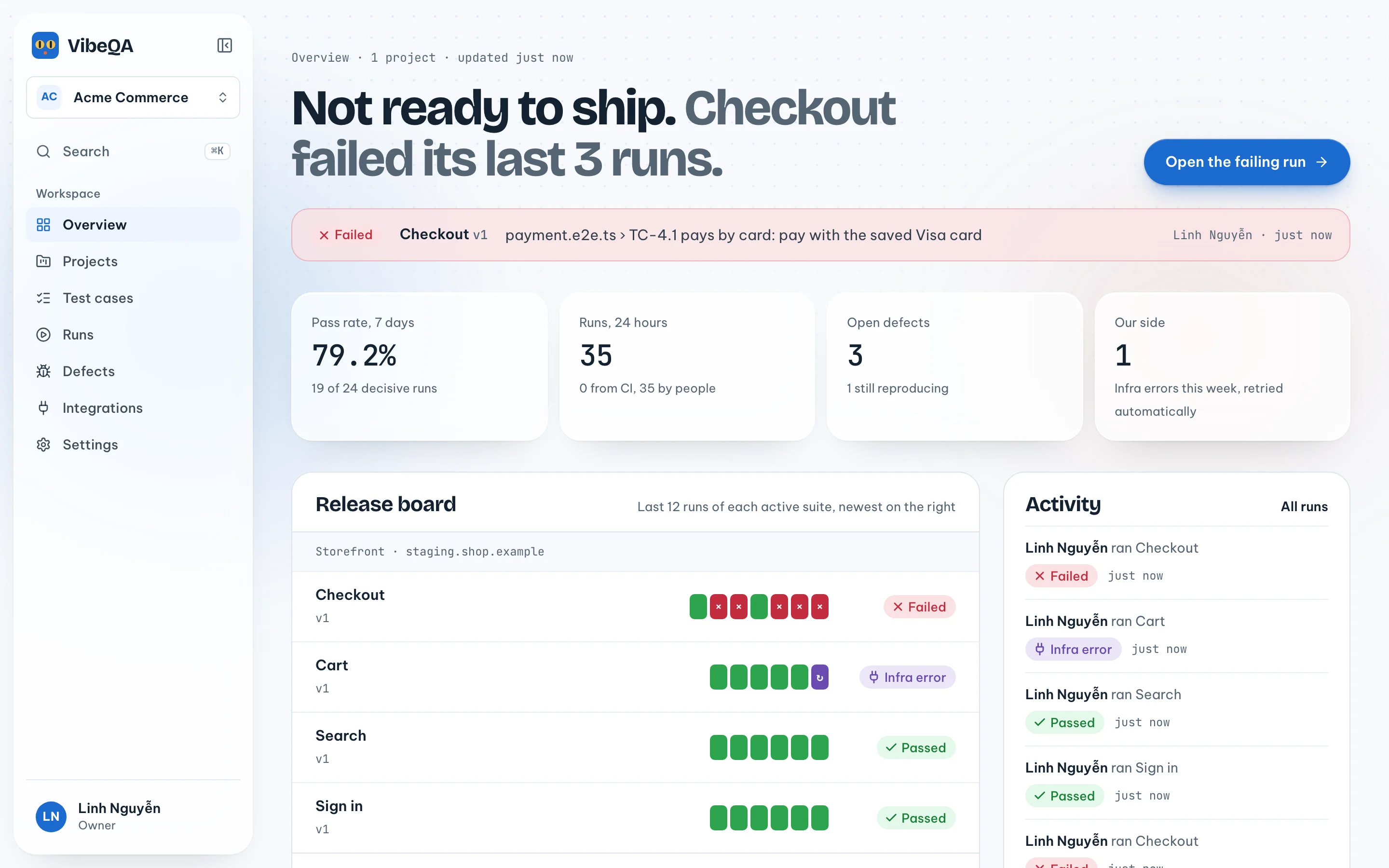
VibeQA is a test tool for web apps. An AI agent called Tokay reads your tickets and specs, drafts a test design your team can review, writes the automation from that design, and runs it in a fresh sandbox. People make the decisions: which cases are right, which version goes live, and what a failing run means for a ticket.
It is built for teams that ship a web app every week or so and want regression checks they trust: QA leads who own the test plan, developers who want to know whether their fix worked, and engineering managers who want to know what "green" actually covers.
Why a gecko
Tokay is named after the tokay gecko, which is named after its call: a loud "to-kay". It is a small joke with a point. Tokay does the writing, but it cannot approve its own work. Every suite version is approved by a person, and only once every case has been reviewed, coverage is complete and a dry run has finished.
The AI test automation loop, end to end
1. Start from what you already have
Point Tokay at a Jira ticket, a Confluence or Notion page, or a document you upload (a PDF or Word file), or just describe the flow in a sentence. Say SHOP-388 describes the Storefront delivery step: the customer enters a phone number and an address, and both are checked before payment. Everything Tokay reads from a ticket, a page or your app is labelled as untrusted text, so instructions hidden in a ticket are treated as content, not as commands.
2. Review a test design, not a test file
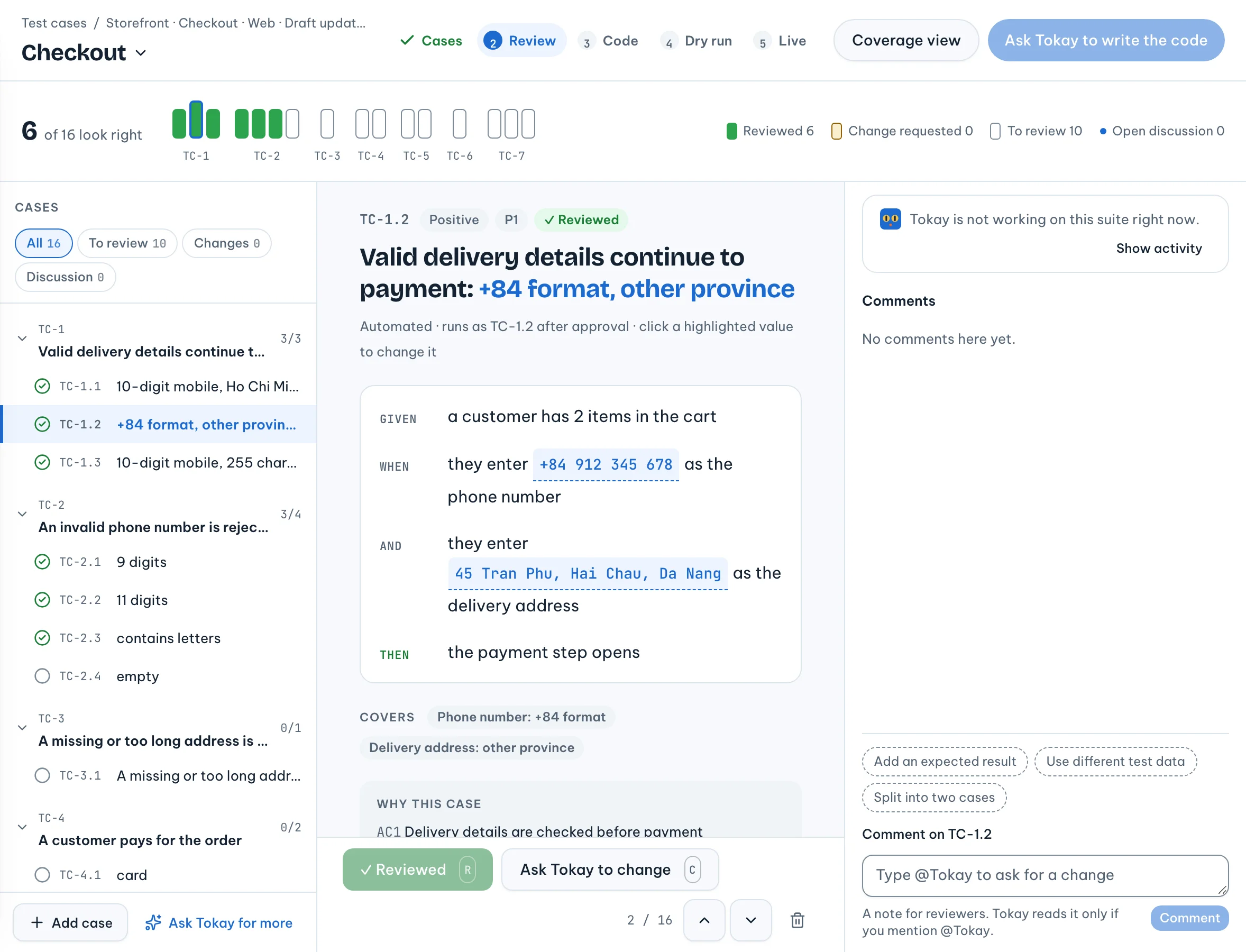
Before any code, Tokay writes a test design: the requirements, every input split into valid and invalid classes with their boundaries marked, and Gherkin scenarios whose Examples rows are the concrete cases. For the phone-number field that means rows for a 10-digit mobile, the +84 format, nine digits, eleven digits and a number with letters in it.
Coverage is computed by a fixed rule, not declared by Tokay or by a reviewer: each class appears at
least once, every boundary is tested, and no row mixes two invalid classes. Your team reviews the
cases one by one. Click "Looks right" on a case, edit it, or comment with @Tokay and accept or reject
the change it suggests. We explain the rules in detail in
Design tests before code.
3. Generate the code, then run it once
When every case is reviewed and coverage is complete, Tokay turns each automated case into one
Playwright-based test named after it, such as TC-1.2. The new version is dry-run once in a sandbox,
and each test result is mapped back to its row in the design. A person then approves the version. A
failing case can still be approved, because a test that reproduces a known bug is supposed to fail.
4. Run in a fresh sandbox
Every run gets its own sandbox with its own browser and network. It holds no platform secrets; the only credential inside is a token that works for that run. Test accounts you add to a project reach only that project's runs. You can start runs by hand ("Run all suites"), on a schedule, or from CI with an API key.
When a run cannot finish because of something on our side, such as a sandbox or the model provider, it is recorded as an infrastructure or model error, retried by the queue, and never shown as a failure of your app.
5. Track the defect and re-verify the fix
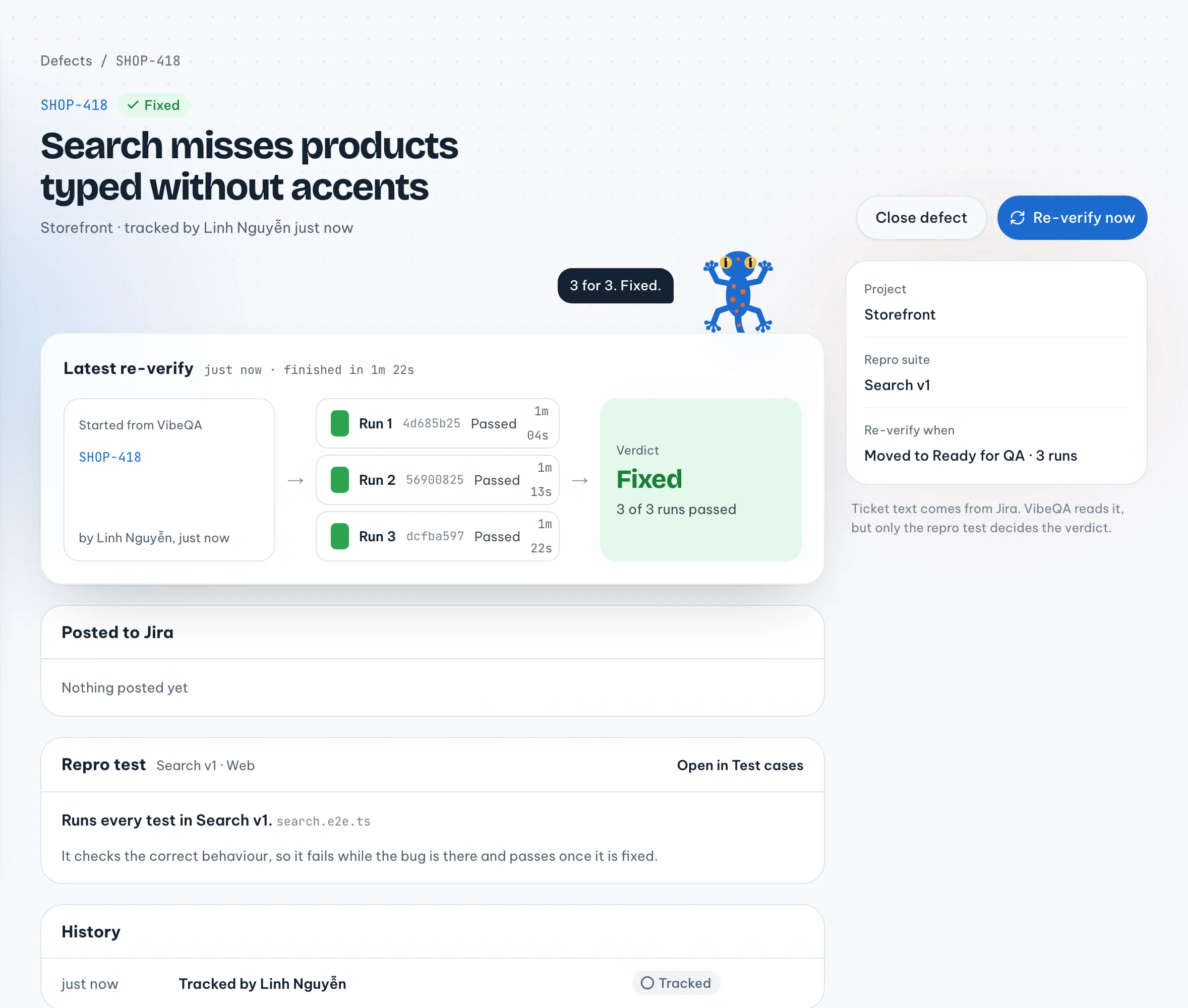
When a test fails because the app is broken, "Report defect" on the run files a Jira bug or links an existing ticket, with the suite version as the repro. You can also start from the other end: "Track a Jira ticket" on the Defects page, then link an approved repro test or ask Tokay to draft one for a person to approve.
When the ticket moves to the status you picked, VibeQA runs the repro three times in fresh sandboxes and posts one verdict back to Jira: fixed, still reproducing, flaky or blocked. Why three is in a separate post.
Hosted or on your own server
VibeQA runs as a hosted service with a free plan for one project, and AI usage is included in every hosted plan. If your apps cannot leave your network, you can self-host it with Docker Compose on one server and your own Anthropic key.
What it does not do yet
- Web apps only. Android and iOS are next, but they do not run today.
- No inbox. A sign-in flow that depends on a magic link or a social login has to stay manual, or you give the tests an exported signed-in session.
- Jira attachments. A defect filed from a run describes the failure; the screenshots and trace stay in VibeQA rather than being attached to the ticket.
Where to go next
- What is different about VibeQA: how it compares with a test-case spreadsheet and hand-written Playwright.
- From sign-up to first run: the first hour with a real project.
- Design tests before code: the test design and coverage rules in detail.