5 min readĐọc bằng tiếng Việt
From a failing run to a Jira ticket, and back
Jira defect tracking with a repro test: how a failing run becomes a Jira Bug, what VibeQA writes on the ticket, and where the Jira connection stops today.
A nightly run of the Storefront checkout suite goes red. The failing test added two products to the cart,
opened /cart, and could not press Pay: on a 375px screen the cart summary covers the button. Someone
now has to write that up in Jira, and later someone has to check whether the fix worked.
In VibeQA, Jira defect tracking hangs both jobs off one thing: the repro test. It checks the correct behaviour, so it fails while the bug is there and passes once it is fixed. A defect in VibeQA is a Jira ticket (or a plain note) plus that test.
A defect can start in two places.
From a failing run: Report defect
Open the failed run and choose Report defect. The dialog asks where the bug is tracked:
- Create a Jira ticket (recommended). VibeQA files a Bug in the Jira project you pick. Jira keeps the assignee, priority and discussion; VibeQA keeps the repro.
- Link a ticket that already exists. Someone filed it already. VibeQA adds this run to the ticket as a comment.
- Keep it in VibeQA only. No tracker. Nothing re-verifies it on its own; you press Re-verify now after a fix.
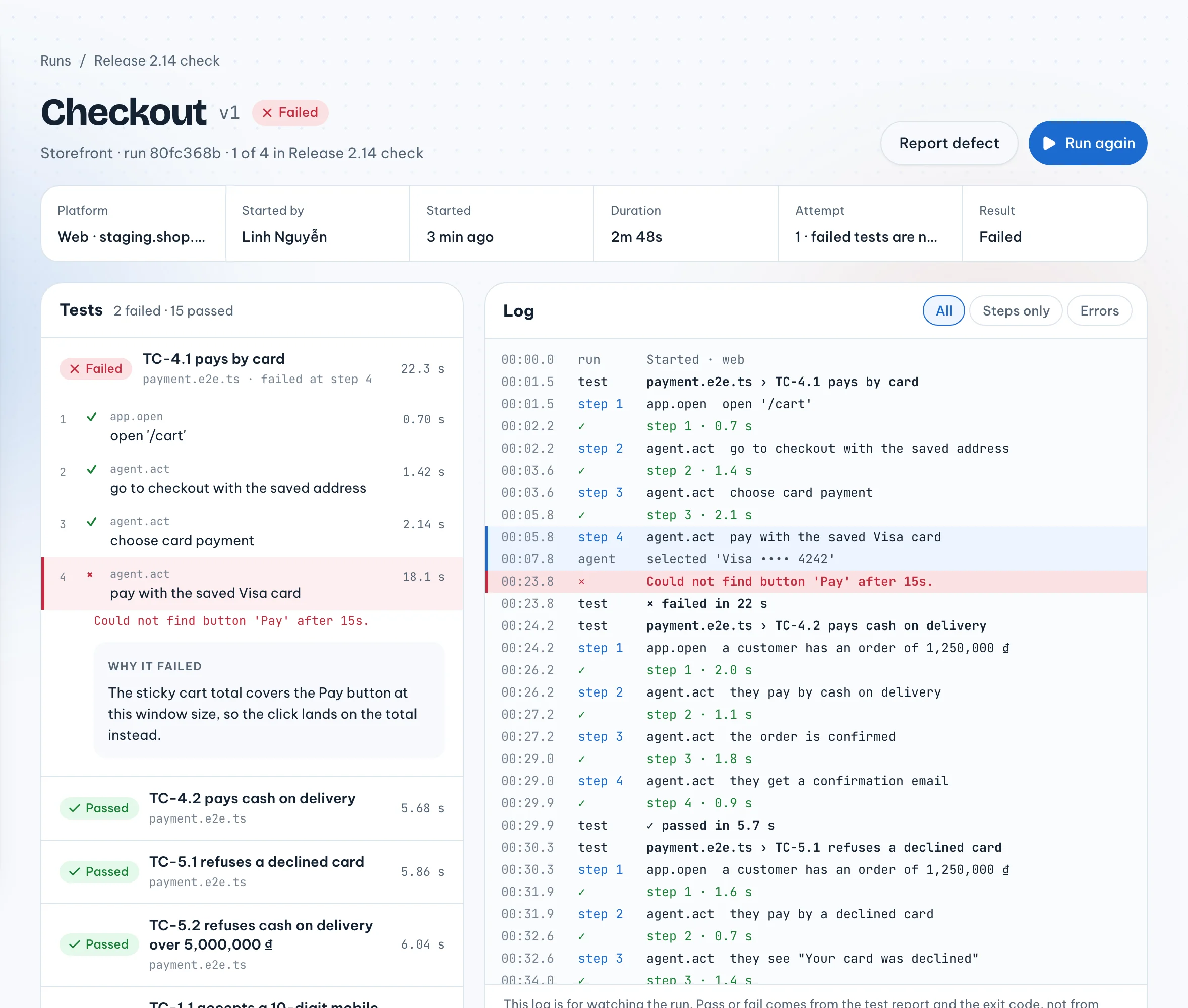
The description is written from the run: the failing test's steps up to the one that broke, what was expected, what actually happened, and a line with the platform, the app URL, the suite version and the run id. You can edit any of it before it goes out. The test account and its password never go into the ticket.
The suite version that just failed becomes the repro. It already fails, so it already proves the bug.
Two limits to know about. The screenshots, video and trace stay on the run page in VibeQA; they are not attached to the Jira ticket, only described. And the repro is the whole suite version, not just the one failing test, so a re-verify runs every test in that version.
From Jira: Track a Jira ticket
Sometimes a bug reaches Jira first and no VibeQA run has caught it. On the Defects page, choose Track a Jira ticket and paste a key like SHOP-431 or a link. VibeQA looks the ticket up and shows its key, status and reporter.
Then you pick the repro test:
- Tokay writes it from the ticket. Tokay reads the ticket and writes one test that checks the correct behaviour. It is a draft like any other: you review it in Test cases, and re-verifies start only after a person approves it. Ticket text is treated as data, not as instructions.
- Use a test case you already have. Pick a case from an approved suite, or every test in that suite. VibeQA runs it once, right away, to prove it fails today.
That proof run matters. A repro that passes while the bug is still open would later report "fixed" for a fix that never happened. So the defect shows the proof run's answer: "Repro fails today, as expected", or, if it passed, "Repro passed today: check it catches the bug".
Tracking Jira defects on the defects board
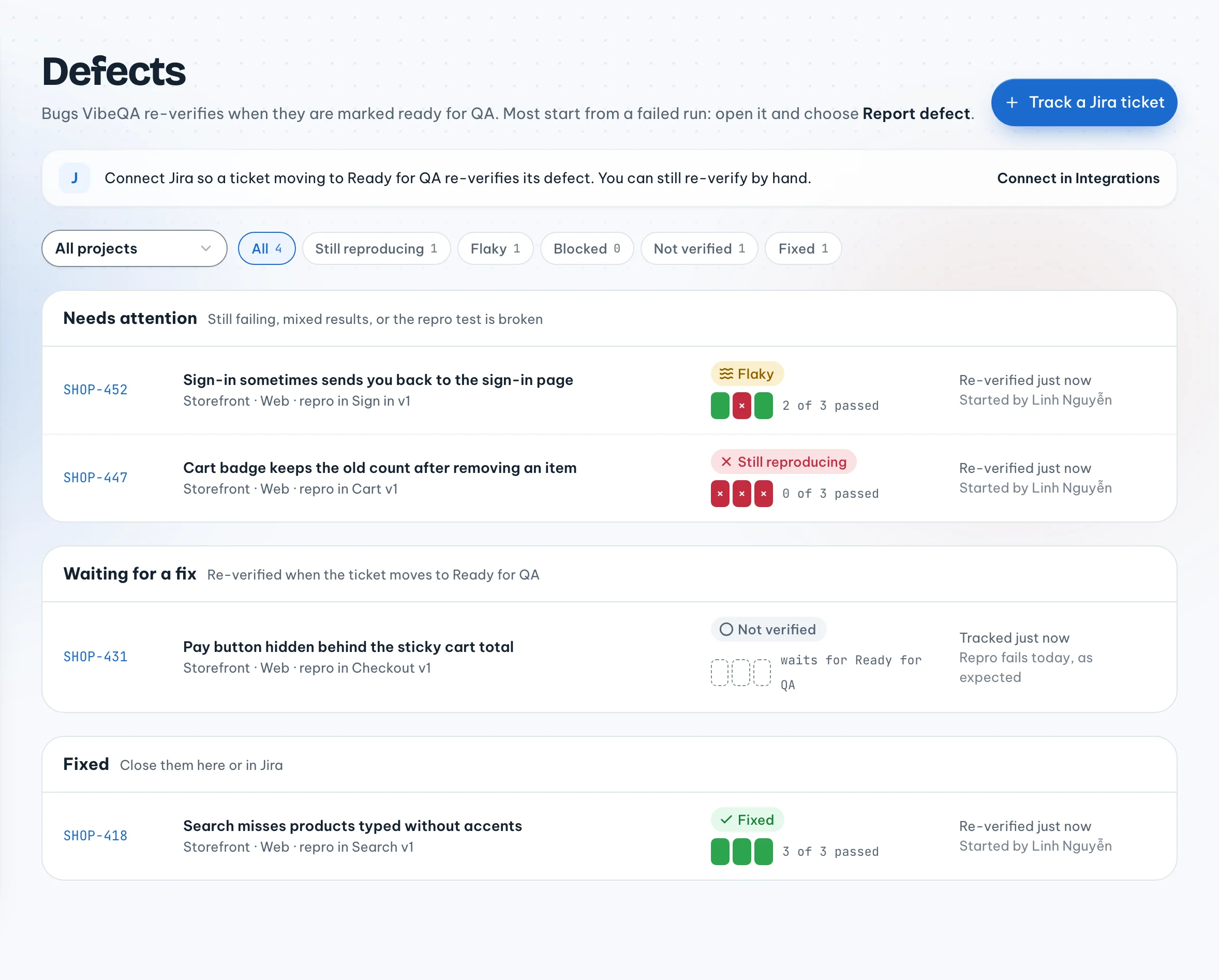
The Defects page lists the open defects of every project you can see, in three sections:
| Section | What is in it |
|---|---|
| Needs attention | Still reproducing, flaky, or the repro test is broken |
| Waiting for a fix | Not re-verified yet; waits for the ticket to move |
| Fixed | The last re-verify passed. Close them here or in Jira |
You can filter by verdict and by project. Each row shows its repro suite and the newest re-verify, with how many runs passed.
What "Posted to Jira" shows
Each defect page has a Posted to Jira panel. It shows the comment VibeQA left on the ticket after the last re-verify: the verdict, how many runs passed, the run ids (failed ones marked), and a link back to the defect. While runs are still going it says VibeQA will comment when they all finish. If Jira is not connected for the project, or the defect has no ticket, it says that instead. If posting fails, VibeQA keeps retrying, and the panel tells you so.
The ticket text shown in VibeQA comes from Jira, but it never decides anything. Only the repro test decides the verdict.
Closing a defect
Close defect takes it off the board and stops re-verifying it. Its last verdict stays on the page. Owners and admins can close defects; members can report and re-verify them but not close them.
Connecting Jira
Owners and admins connect Jira in Integrations with three things:
- The Site URL of your Atlassian Cloud site, like
https://acme.atlassian.net. Onlyatlassian.netsites are accepted. - The Atlassian account email.
- An API token from id.atlassian.com. VibeQA checks it with Atlassian, then stores it encrypted.
A connection can be for the whole organization or for one project. A project with its own connection uses it instead of the organization's.
To re-verify on ticket moves, create a webhook in the same page, paste its URL and signing secret into Jira (Settings → System → Webhooks, "Issue updated"), and pick the status that means "check this now". By default that is Ready for QA.
There is no OAuth yet. An Atlassian API token acts as the person who created it, sees what they can see, and expires (at most a year later). VibeQA cannot refresh it; when it expires, someone connects again with a new one.
What happens next
When the ticket moves to Ready for QA, VibeQA runs the repro test three times and turns the results into one verdict. Why three, and what each verdict means, is the subject of the next post: Why we run a fix three times before we call it fixed.