5 min readĐọc bằng tiếng Việt
Running suites from CI and on a schedule, and keeping flaky tests honest
Gate pull requests on VibeQA, run every suite nightly, hear about new failures, and handle flaky tests in CI with history and quarantine, not by hiding bugs.
Approved suites are only useful if they run at the right moments (before a pull request merges, every night against staging, and whenever someone asks) and if a few flaky tests in CI don't teach everyone to ignore red. In VibeQA all three moments start the same thing, a project run: one run per approved suite, each in its own fresh sandbox. You can start one with Run all suites, from CI, or on a schedule.
CI API keys
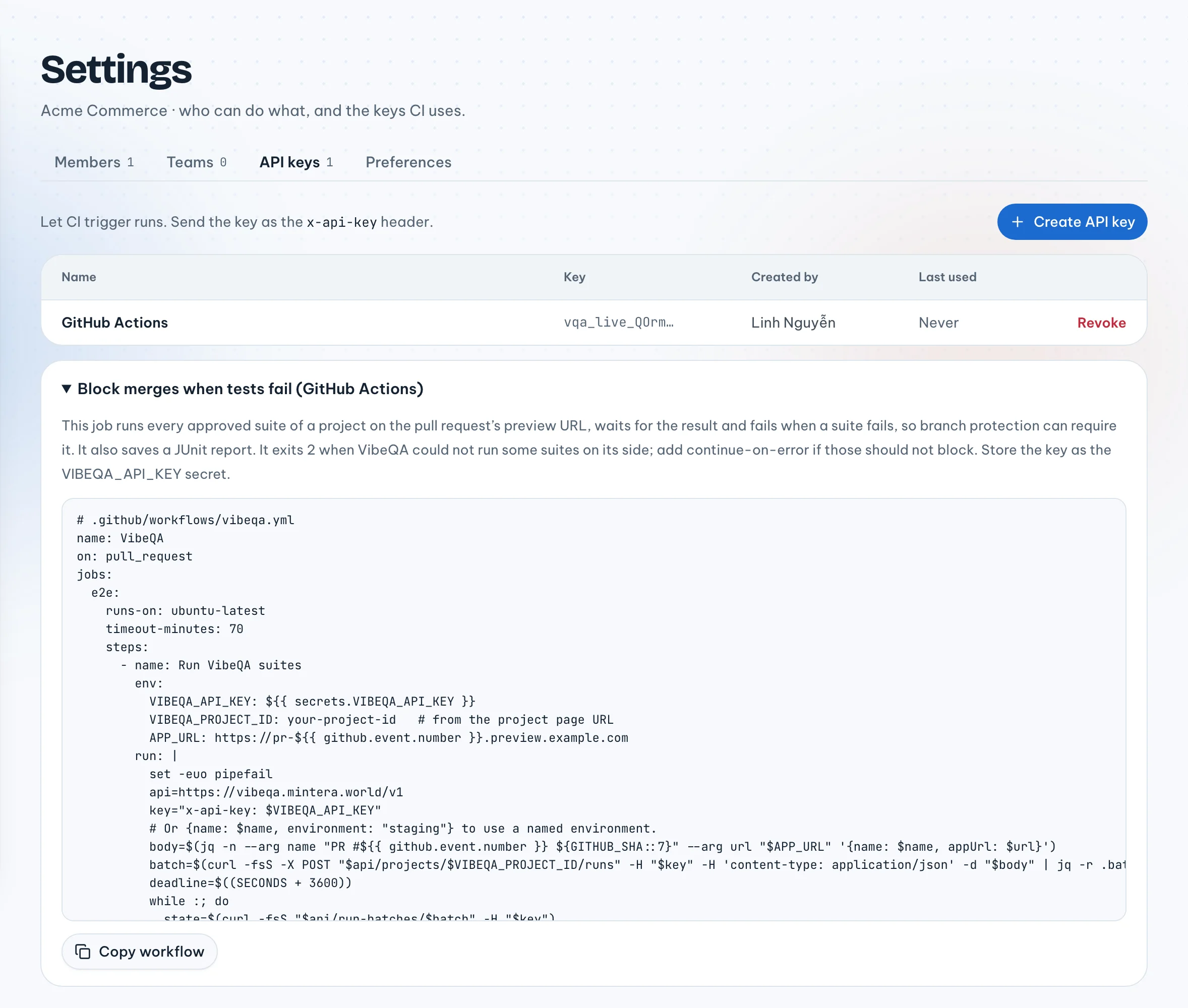
CI talks to VibeQA with an API key. Owners and admins create keys in Settings → API keys. The key is
shown once, and CI sends it as the x-api-key header.
A key acts as the person who created it, with their current role. If that person's role changes, the key changes with it, and if they are removed from the organization, their keys stop working. Name keys after where they live, like "GitHub Actions · storefront", so a revoke later is an easy decision.
Gating a pull request
The same page has a GitHub Actions workflow you can copy. It runs every approved suite of a project against the pull request's preview URL, waits, saves a JUnit report and fails the job when a suite fails. The core of it:
api=https://vibeqa.mintera.world/v1
key="x-api-key: $VIBEQA_API_KEY"
body=$(jq -n --arg name "PR #$PR" --arg url "$APP_URL" '{name: $name, appUrl: $url}')
batch=$(curl -fsS -X POST "$api/projects/$VIBEQA_PROJECT_ID/runs" \
  -H "$key" -H 'content-type: application/json' -d "$body" | jq -r .batch.id)

until state=$(curl -fsS "$api/run-batches/$batch" -H "$key") &&
      [ "$(jq -r .status <<<"$state")" = finished ]; do sleep 15; done

curl -fsS "$api/run-batches/$batch/junit" -H "$key" -o vibeqa-junit.xml
case "$(jq -r .result <<<"$state")" in
  passed) exit 0 ;;
  failed) exit 1 ;;
  *) exit 2 ;;   # error or cancelled: VibeQA could not run some suites
esac
The copied workflow also gives up after an hour and cancels the project run; we left that out here.
Instead of an appUrl you can name an environment you set up in the project, like staging. A preview URL
has to be reachable from the internet; private and loopback addresses are refused.
result is one of four values once every run has finished:
result | When |
|---|---|
passed | Nothing failed and nothing errored |
failed | A suite failed, or its test itself was broken |
error | Some suite could not run because of our side: infrastructure or the AI model |
cancelled | Every run was cancelled |
The workflow exits 2 for anything that is not a pass or a fail, so you can decide whether trouble on our side should block a merge. Mark the job required in branch protection and the gate is done.
One limit: VibeQA posts no commit status and no pull request comment. The gate is your CI job and its JUnit report.
Schedules
In a project's Settings tab, Schedules runs all suites on a timetable: every day, weekdays, every Monday, every hour, or your own cron expression, in the time zone you choose. You can point a schedule at an environment too.
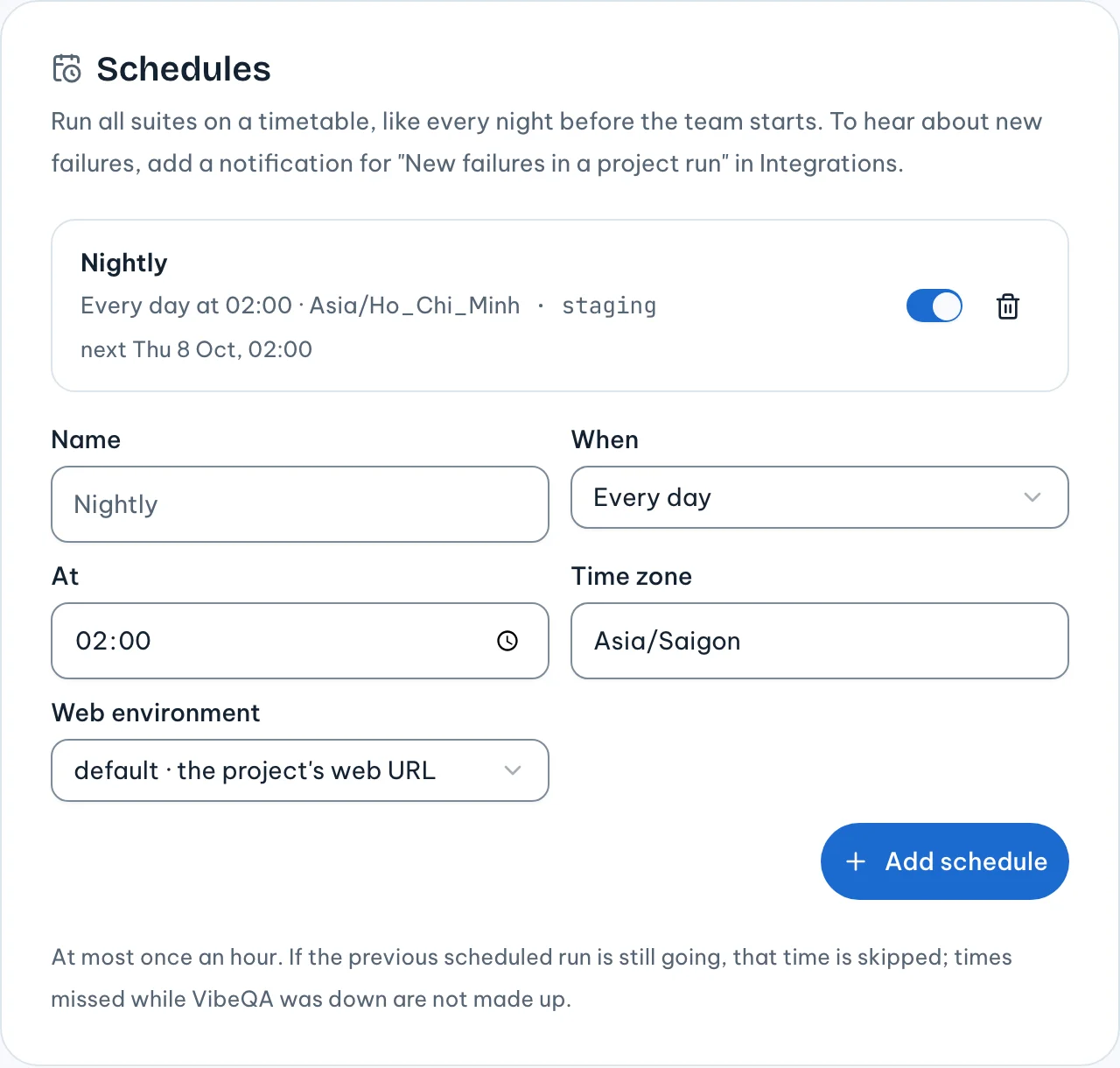
A few rules keep schedules from piling up:
- At most once an hour.
- If the previous scheduled run is still going, that time is skipped, and the schedule shows why.
- Times missed while VibeQA was down are not made up later.
There is no daily run cap per organization yet, and a schedule that keeps being skipped is not turned off for you.
Hearing about it
In Integrations, a notification sends project runs to Slack, Telegram or another channel. Two events are about project runs:
- Every finished project run: one message per Run all suites or schedule, with how many suites passed or failed.
- New failures in a project run: only when a suite that passed last time fails now.
The message lists what is newly broken since the last run, what is passing again, and links to the run board. For a nightly schedule, the second event is usually the one worth a channel.
Test history
Each suite has a History tab: every test across its recent runs, its pass rate, and a flag on the
flaky ones. Tests are matched across runs by their case id, like TC-2.3, when the title has one, and by
title otherwise.
A test is flaky when it switched between passing and failing at least twice over five or more results, or passed only on retry twice. Two switches, not one: a test that failed and then passed after a fix is not flaky.
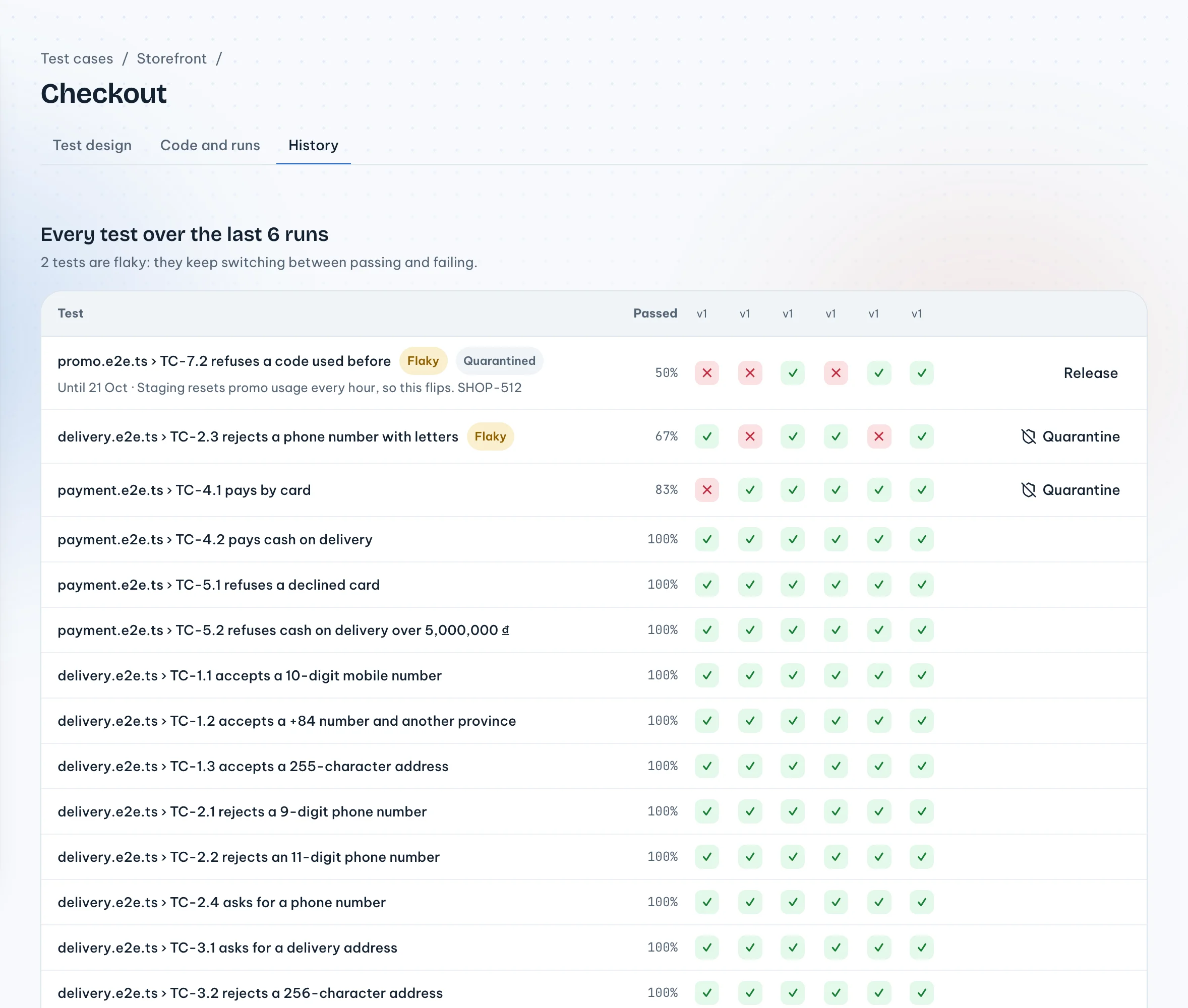
History is per suite. There is no project-wide or organization-wide flaky list yet.
Quarantining flaky tests in CI
A flaky test that fails every third night teaches people to ignore red. Quarantine it for up to 30 days with a reason, such as "The payment sandbox times out; ticket SHOP-88". It keeps running and its history keeps filling, so you can see when it recovers. While it is quarantined, its failures alone do not fail a run: the run passes with "Passed: the only failing tests are quarantined." You can release it early.
Quarantine has a hard edge. Re-verify runs and dry runs still count the test, so a quarantine never silences a defect's repro, and a dry run before approval still reports every failure.
Where the series ends
This is the last post in the series. We started with what automation testing is and why end-to-end suites decay, and everything since has been one answer to that: designs a person can review, isolated runs, outcomes that keep our failures apart from yours, and fixes checked three times. If you want to try it on your own app, sign-up is free for one project.